I always enjoy reading the ongoing profile Claude maintains as part of its memory feature. As with anything generated by a LLM, it tends to be a mixture of surprisingly great synthesis of my AI use and total whimsical nonsense.
By far the most important part of my personal profile:
I’ve always said, never mix a drink that isn’t evidence-based!
Lately, I’ve been working on some fun Home Assistant automations based on whether my kids are in the house. The challenge? My kids don’t have cell phones, so traditional presence detection won’t work. So instead, I hacked together a solution using Google Calendar events and day-of-week logic.
With this setup, I can do things like:
Get a notification if the TV turns on when it shouldn’t be
Turn off the lights in the kids’ rooms automatically when they’re at school
But since my kids don’t have cell phones, presence detection is trickier than normal, so I’ve had to mimic it using Google Calendar events and simple logic surrounding the days of the week.
This is pretty easy to do by creating an input_boolean helper entity (Settings → Devices & Services → Helpers → Create Helper → Toggle) and a corresponding automation to update it:
alias: Update Kids In House Status
description: Updates kids' presence in house based on criteria
triggers:
  - minutes: /5
    trigger: time_pattern
  - entity_id: calendar.google_calendar_personal
    trigger: state
  - event: start
    trigger: homeassistant
conditions: []
actions:
  - target:
      entity_id: calendar.google_calendar_personal
    data:
      start_date_time: "{{ today_at('00:00') }}"
      end_date_time: "{{ today_at('23:59') }}"
    response_variable: todays_events
    action: calendar.get_events
  - variables:
      event_summaries: >-
        {{ todays_events['calendar.google_calendar_personal'].events |
        map(attribute='summary') | list }}
      has_grandma: "{{ 'Kids with Grandma' in event_summaries }}"
      has_no_school: "{{ 'No School' in event_summaries }}"
      current_hour: "{{ now().hour }}"
      is_saturday: "{{ now().weekday() == 5 }}"
      is_sunday: "{{ now().weekday() == 6 }}"
      school_day: >-
        {{ (not is_saturday and not is_sunday) and current_hour >= 8 and current_hour <
        15 }}
      kids_away: "{{ has_grandma or (school_day and not has_no_school) }}"
  - if:
      - condition: template
        value_template: "{{ kids_away }}"
    then:
      - target:
          entity_id: input_boolean.kids_in_house
        action: input_boolean.turn_off
    else:
      - target:
          entity_id: input_boolean.kids_in_house
        action: input_boolean.turn_on
mode: single
The automation checks every 5 minutes whether specific calendar events exist (“Kids with Grandma” or “No School”), combines that with school hours (8am-3pm on weekdays), and flips the input_boolean accordingly. When the kids are away—either at school during normal hours or with grandma per the calendar—the boolean turns off. Otherwise, it stays on.
One of my favorite features of Uniden BCDx36- and SDS- series radios is the ability to enable a favorites list and let the radio record continuously for days or weeks.
This feature is very effective for discovering activity on new systems, digging through frequencies found in the FCC database to determine what’s being used, or quickly getting a read on which ham radio repeaters are active in a given area – all without being in front of the radio all day.
It also pairs very well with the “negative delay” feature, which lets you make sure that a dead carrier or trunked system control channel won’t tie up your radio and storage space for more than 10 seconds before it moves on.
The downside is that it’s easy to just let the radio sit recording for weeks on end, leading to a large pile of recordings that can be time-consuming to sift through, even with tools like Universal Scanner Audio Player.
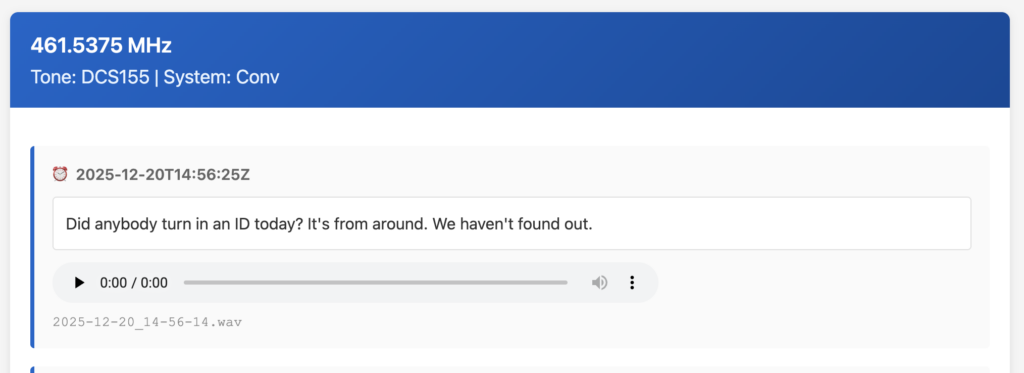
To that end, I built a proof-of-concept tool in Perl that can dig through a folder full of WAV files, collate them by frequency/tone, attempt to transcribe them using a local instance of OpenAI Whisper, and provide an easy-to-read HTML page showing the transcriptions, timestamps, and easy access to the recording audio.
This project depends on the excellent work from Bearcatter, whose wavparse Go library makes it possible to extract Uniden-specific metadata from WAV files.
Tired of manually checking Google Maps and your calendar to figure out when to leave for your next meeting?
I recently realized that Home Assistant already has all the necessary pieces – my current geolocation, calendar events, and Waze travel time – so I put together an automation to provide real-time notifications telling me exactly when I need to head out the door.
It’s pretty simple, following these steps every five minutes:
Retrieve all events in the next 4 hours from my work and personal calendars
Eliminate all-day events, events with no location, or events I’ve already been reminded of (stored in a helper input sensor called last_notified_event_id)
For the remaining events, retrieve Waze travel time from my current location to the event location (using entity location versus a static address or lat/long is important because I might not be at home, affecting travel time)
Determine departure time (start time minus travel time minus 5 minutes of wiggle room)
Determine reminder time (30 minutes prior to departure time)
Send a notification to my phone alerting me to the upcoming event, estimated travel time, and the time I need to leave
Store a synthetic “event ID” (the start time and summary) in an input helper sensor, so we can make sure I’m not reminded again
Note: I’m pretty new to Home Assistant templating (though a past life as a Perl dev has hammered YAML syntax into my head irreversably) so there may be stupidity in this automation. But, it works for me (so far!)
alias: Drive time alert
description: ""
# fire every five minutes
triggers:
  - trigger: time_pattern
    minutes: /5
conditions: []
actions:
  - action: calendar.get_events
    metadata: {}
    data:
      duration:
        hours: 4
        minutes: 0
        seconds: 0
    target:
      entity_id:
        - calendar.personal_calendar
        - calendar.work_calendar
    response_variable: cal_events
  - repeat:
      for_each: "{{ cal_events.values() | map(attribute='events') | sum(start=[]) }}"
      sequence:
        - variables:
            thisEventId: "{{ repeat.item.start }} {{ repeat.item.summary }}"
        - condition: template
          value_template: |
            {{ repeat.item.location is not none and
               (repeat.item.location | string | trim != "") and
               'T' in (repeat.item.start | string) and
               states('input_text.last_notified_event_id') and
               thisEventId != states('input_text.last_notified_event_id') }}
        - data:
            origin: person.mike
            destination: "{{ repeat.item.location }}"
            region: us
          response_variable: waze_eta_result
          continue_on_error: false
          action: waze_travel_time.get_travel_times
        - variables:
            wiggle_room: "{{ 5 }}"
            waze_duration: "{{ waze_eta_result['routes'][0].duration | round(0) }}"
            start_time: "{{ repeat.item.start }}"
            start_time_friendly: "{{ as_datetime(start_time).strftime('%I:%M %p') }}"
            location: "{{ repeat.item.location }}"
            summary: "{{ repeat.item.summary }}"
            departure_time: >-
              {{ as_datetime(start_time) - timedelta(minutes=waze_duration) -
              timedelta(minutes=wiggle_room) }}
            departure_time_friendly: "{{ as_datetime(departure_time).strftime('%I:%M %p') }}"
            reminder_time: "{{ as_datetime(departure_time) - timedelta(minutes=30) }}"
        - condition: template
          value_template: |
            {{ as_datetime(reminder_time) <= now() }}
        - action: notify.mobile_app_pixel_6_mike
          metadata: {}
          data:
            data:
              ttl: 0
              priority: high
            message: >-
              Drive time to your next appointment ({{summary}}) is
              {{waze_duration}} minutes. Depart by {{departure_time_friendly}}
              for arrival by {{start_time_friendly}}.
            title: Drive Time Alert - {{ repeat.item.summary }}
        - action: input_text.set_value
          metadata: {}
          data:
            value: "{{ thisEventId }}"
          target:
            entity_id: input_text.last_notified_event_id
mode: single